Oct 5, 2026

How to Prioritize AI Features for Your SaaS Product (2026 Roadmap)
The Problem Isn't Whether to Add AI — It's What to Build, and in What Order
Every SaaS team is under pressure to ship AI. The board wants it, buyers expect it, and competitors are announcing it. So teams bolt on a chatbot, slap 'AI-powered' on the site, and move on. Then the feature goes unused, costs money on every call, and changes nothing. This is the norm, not the exception: only about 28% of AI projects deliver real ROI, according to Gartner (2026), and an MIT study found roughly 95% of enterprise generative-AI pilots produced no measurable return. The failure is almost never the model. It's building the wrong AI features, in the wrong order.
A good AI product roadmap fixes that. It's not a list of everything AI could do — it's a sequenced plan of what to build first, what to build next, and what to deliberately skip. This piece is that roadmap, plus the single test that tells you where any AI feature belongs.
The One Test for Every AI Feature
Before the roadmap, here's the filter that does most of the work. For any AI feature you're considering, ask two questions: Does it sit inside a real workflow my users already care about? and Do I have the data to make it genuinely good — and a feedback loop to make it better? If the answer to both is yes, it's a build-first candidate. If it's a workflow but you have no data edge, it's build-next at best. If it's neither — if it's an AI feature that exists to look modern rather than to improve something users do — it belongs in the skip pile. Almost every wasted AI feature fails this test, and almost every one that works passes it.
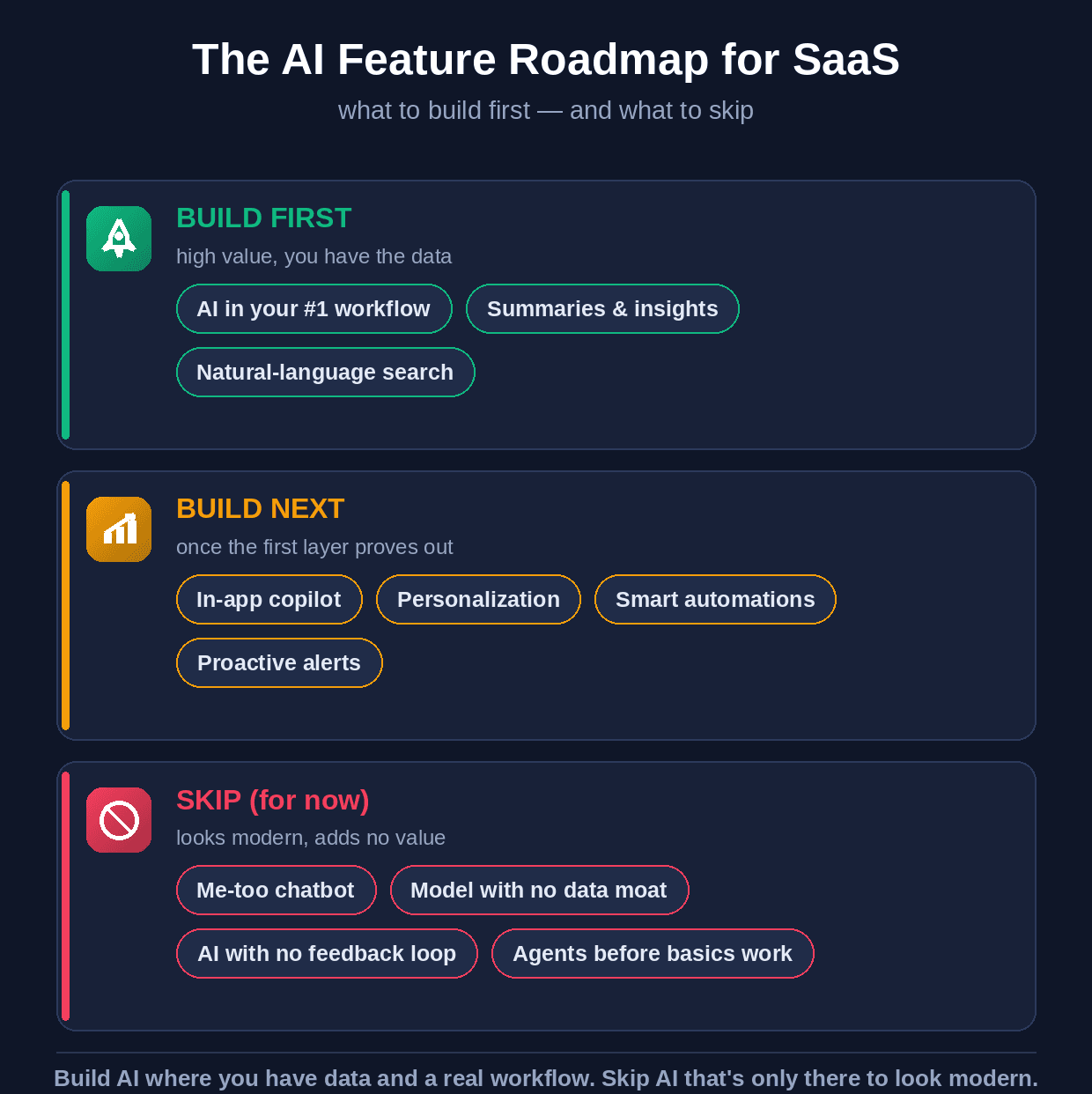
The AI feature roadmap for SaaS — build first, build next, and what to skip.
Build First: High Value, and You Have the Data
These are the features that attach to what users already do every day, run on data you already have, and deliver a visible 'the product got smarter' moment fast. Start here.
1. AI inside your #1 workflow — Find the single thing users come to your product to do most, and make AI remove the friction in it. Not AI bolted on the side — AI inside the core job. This is where adoption and willingness-to-pay are highest, because it improves something users already value.
2. Summaries and insights — Turn the data your product already holds into plain-language 'here's what changed' and 'here's what this means.' Highest value for the lowest effort — it uses existing data, needs no new interface, and makes the product feel intelligent immediately.
3. Natural-language search — Let users ask for what they need instead of hunting through filters and menus. It runs on your existing content and data, and it's the feature users increasingly expect by default.
Build Next: Once the First Layer Proves Out
These are higher-effort and more powerful, and they build on the foundation (and the data and user trust) the first tier creates. Sequence them after.
4. In-app copilot — An assistant that answers questions, guides users, and eventually takes actions. It's where premium pricing lives — but it's a large build, and it works far better once your summaries, search, and data layer already exist.
5. Personalization — Tailoring the experience to each user and segment. It needs usage data to be any good — which is exactly what the first tier starts generating.
6. Smart automations and proactive alerts — The product starts doing work for the user and flagging what needs attention before they ask. High value, but it depends on clean data and well-understood workflows underneath.
Skip (For Now): Looks Modern, Adds No Value
This is the half of the roadmap most teams get wrong — and the most valuable part of this guide. These are the AI features that burn budget, erode trust, and show up in those 'AI projects that failed' statistics. Skip them until the reason to build them is real.
1. The me-too chatbot — A generic chat bubble that answers from your help docs, added because everyone has one. If it doesn't sit in a real workflow and resolve something specific, it's a support ticket users will avoid. Skip it unless it earns its place in a genuine use case.
2. An AI feature with no data moat — If your AI feature is just a thin wrapper over a hosted model that any competitor can ship in a weekend, it's not a product advantage — it's table stakes at best and a cost center at worst. Build AI where your proprietary data makes it uniquely good.
3. AI with no feedback loop — A feature that can't learn from how users respond will never improve, and will quietly decay as expectations rise. If you can't instrument whether the AI is helping and feed that back in, don't ship it yet.
4. Autonomous agents before the basics work — Agents are the exciting end state, but they act on your data, workflows, and integrations — and if those aren't solid, an agent just automates the mess faster. Gartner expects a large share of agentic AI projects to be cancelled precisely for this reason. Earn your way to agents; don't start there.
The thread through all four: AI is not a feature you add to look current — it's a capability you build where you have an edge. Skipping the wrong AI features is as important to the roadmap as shipping the right ones, because every one you skip is budget and trust you keep for the features that actually move the business.
How to Sequence It
Put the two tests on two axes and the order becomes obvious. Rank every candidate feature by value to the user (how central the workflow) and by your readiness (data and feedback loop). High value plus high readiness ships first. High value but low readiness goes on the roadmap with a note on what data you need to earn it. Low value gets cut, however impressive the demo. And one discipline that keeps the whole roadmap honest: price and scope each feature against its running cost, because an AI feature users love can still lose money on every call if the unit economics aren't designed in.
If the feature is… | …then | Why |
|---|---|---|
In your core workflow + you have data | Build first | Highest adoption, fastest visible value |
Valuable but you lack the data/loop | Build next | Earn it as the first tier generates data |
Impressive demo, no real workflow | Skip | Where most AI budget is wasted |
A thin wrapper anyone can copy | Skip | No moat; table stakes at best |
Agentic, but basics aren't solid | Skip for now | Agents amplify a weak foundation |
What to Do This Week
Don't plan the whole roadmap in the abstract. Do this. First, write down your single most-used workflow — the one thing users open your product to do — because that's where your build-first AI feature lives. Second, list the data you actually own that a model could act on; that list decides what's build-first versus build-next. Third, take your current AI backlog and run every item through the one test (real workflow + data and feedback loop) and move the failures to a 'skip for now' list. That exercise — an afternoon's work — turns a vague 'we need AI' into a sequenced roadmap with a clear first build and a clear list of what not to waste time on.
Building the Roadmap Into a Real Product
Knowing what to build first is the strategy; building it well — on your data, with the feedback loops and unit economics designed in, shipped fast rather than over a year — is the hard part, and it's where most SaaS teams stall. That's the kind of AI product work Wedigtech does: taking a validated AI roadmap and building and shipping the features that actually move retention and revenue, with the data and infrastructure underneath them. The roadmap and the order are the same whether you build it in-house or with a partner.
If it would help to map this to your own product — which AI feature to build first, what to skip, and what it would take to ship it — that's a short conversation worth having, and you can book a call to walk through your roadmap together.
Was this helpful?
Ready to architect your next stage of growth?
Partner with wedigtech and turn ambition into compounding, measurable outcomes.
More from Insights
View All
How Smart Brands Use AI for Marketing in 2026 (Case Study + Playbook)
How new-age brands use AI for marketing — the six core plays, a deep case study of Spotify's AI marketing engine, the real learning for everyone else, and how to build it.
Read More
100+ AI Tools for B2B SaaS Founders (Organised by Use)
A categorised directory of 100+ AI tools for B2B SaaS founders — for content, SEO, sales, support, coding, automation, analytics and more — with what each one is best for.
Read More
The AI Features Every Modern Pharma App Should Have
The AI features a pharma company can build into its app — from smart adherence and an AI assistant to drug-interaction safety and risk prediction — the business value of each, and how to build them compliantly.
Read More