Sep 15, 2026

ClickUp Brain AI for Founders: 10 Use Cases, the AI Notetaker, and Why It Replaces Your Whole Stack
The Problem: You're Running a Company You Can't Actually See
Ask a founder how their business is doing, and watch what happens next. They can't just answer — they have to go find out. A message to the sales lead. A check-in with operations. A ping to whoever owns the product launch. To hold a picture of the whole company in their head, a founder has to physically chase it down, department by department, project by project. And by the time they've assembled it, part of it is already out of date.
This is the real project-management problem, and almost every founder and enterprise leader has it: you have no live insight into what's actually going on. Work is scattered across a dozen tools, updates live in people's heads, and the only way to know the status of anything is to interrupt someone and ask. Projects drift. Departments operate in silos. Things fall through the cracks because no one has the full picture — and the person who comes closest is the founder, carrying it all around, exhausted, and still guessing.
Traditional project management tools didn't fix this. They gave you somewhere to put tasks, but they still required someone to update them, chase them, and turn them into a picture you could understand. What's changed is AI — specifically, an AI that lives inside your work and can see all of it. That's what ClickUp Brain is. Here's exactly what it does, how to use its AI Notetaker, and why it can replace most of the tools you're paying for.
What ClickUp, Brain AI, and the AI Notetaker Actually Do
Start with the platform. ClickUp is an all-in-one work platform — it holds your tasks, documents, chats, goals, dashboards, and projects in one place instead of scattered across separate apps. On top of that sits ClickUp Brain, an AI layer that indexes everything in your workspace and can answer questions, write, automate, and even act on your behalf. And built into it is the AI Notetaker, which joins your meetings, writes the notes, and turns what was decided into tracked tasks — automatically.
Put simply: ClickUp is where the work lives, Brain is the intelligence that reads all of it and gives you answers and automation, and the AI Notetaker makes sure nothing said in a meeting is ever lost. Below are ten concrete ways founders and enterprises are using Brain right now.
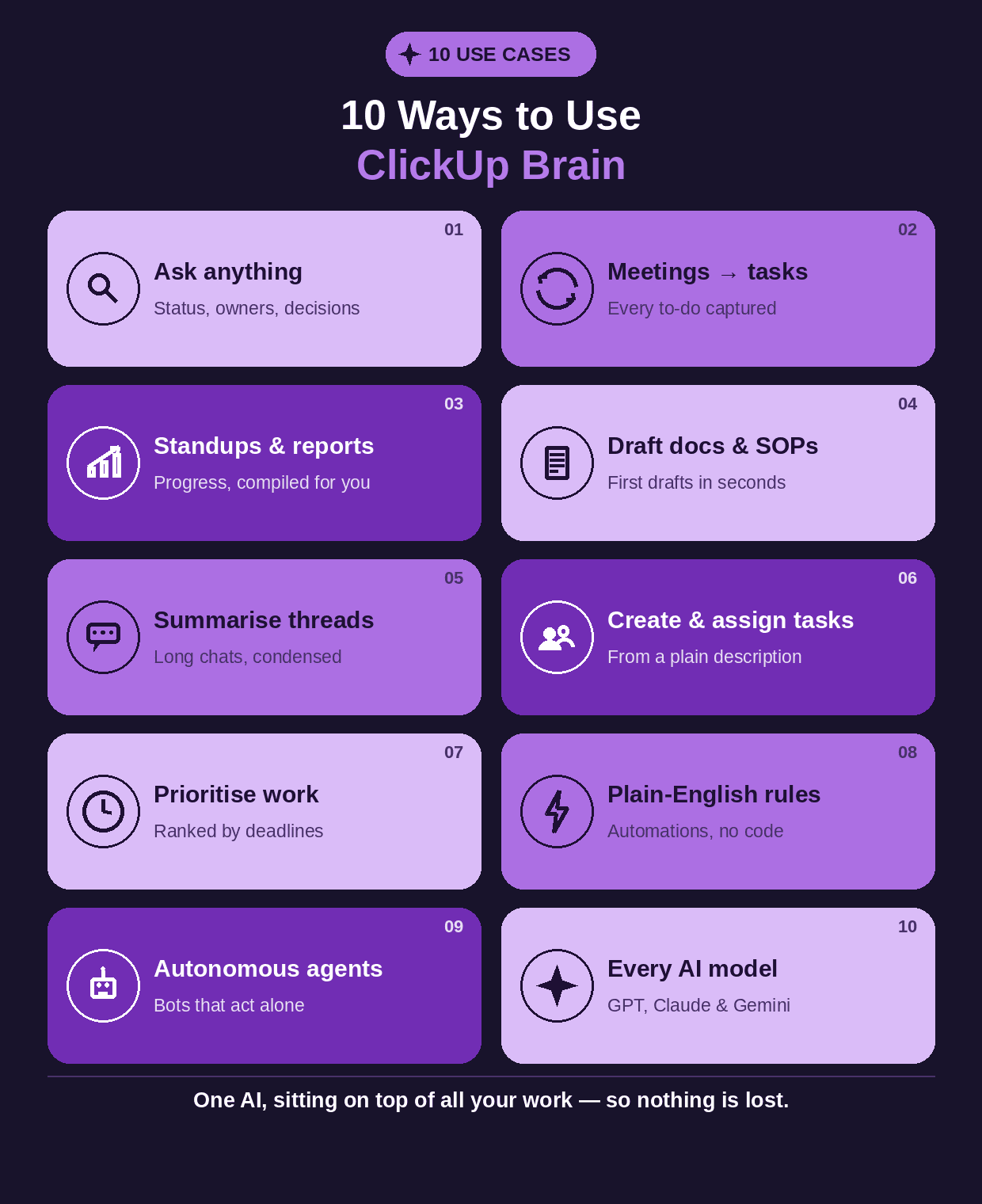
Ten use cases of ClickUp Brain — one AI sitting on top of all your work.
10 Use Cases of ClickUp Brain AI
1. Ask your workspace anything — Type a plain-language question — “What's the status of the Q1 launch?”, “Who owns the website redesign?”, “What did we decide last week?” — and Brain answers instantly from your real tasks, docs, and comments. This alone replaces hours of chasing and gives you the live visibility the whole problem was about.
2. Turn meetings into action items — Brain (via the AI Notetaker) captures every to-do discussed and turns it into a real task with an owner and due date, so nothing said in a meeting is forgotten.
3. Auto-write standups and status reports — Instead of chasing your team for updates, Brain compiles what everyone worked on from tasks and activity, and produces the standup or status report on its own.
4. Draft documents, SOPs, and emails — Brain writes first drafts of project briefs, standard operating procedures, meeting agendas, and emails using your workspace context — so it's relevant, not generic, and you edit instead of starting from scratch.
5. Summarise long threads and documents — Point Brain at a long comment thread, a dense document, or a whole project, and it gives you a clear summary in seconds — catching you up without reading everything.
6. Create and assign tasks from a description — Describe what needs to happen in plain language and Brain generates the tasks and subtasks, and can assign them to the right people based on who has capacity.
7. Prioritise work automatically — Brain suggests what to work on next based on deadlines and dependencies, so your team focuses on what actually matters instead of guessing.
8. Set automations in plain English — Write a rule the way you'd say it — “when a task is marked urgent and unassigned, give it to the person with the lowest workload” — and Brain sets up the automation, no technical setup required.
9. Run autonomous AI agents — Beyond assisting, Brain runs agents that act on their own within your rules — a Project Manager agent, a Deadline Guardian, a Content Reviewer — taking routine oversight off your plate entirely.
10. Use every top AI model in one place — Brain gives you access to premium models like GPT, Claude, and Gemini under a single subscription, automatically choosing the best one for each task — so you don't need separate AI tools at all.
How to Use the ClickUp AI Notetaker (Step by Step)
The AI Notetaker is the feature that stops meetings from evaporating into forgotten promises. Here is exactly how to use it and what it does at each stage.
Step 1: Turn it on for your meetings. Enable the AI Notetaker and connect it to your calendar, or start a call directly inside ClickUp. From then on, it joins your meetings automatically — you don't have to remember to hit record.
Step 2: Just be present. During the call, the Notetaker transcribes and follows the conversation for you. You stop splitting your attention between talking and scribbling notes — it's capturing everything.
Step 3: Get an instant summary and action items. The moment the call ends, it produces a clean summary of what was discussed and a list of the action items — the concrete things people agreed to do.
Step 4: Watch it turn action items into tasks. This is the key step: it automatically converts each action item into a real task in your workspace, with an owner and a due date attached. The follow-up is assigned before anyone has left the call.
Step 5: Let it post to your team. It can automatically drop the summary and the action items into your team's chat channel, so everyone is aligned without a single “what did we decide?” message.
Step 6: Review and adjust. Glance over the auto-created tasks, tweak an owner or a date if needed, and you're done. What used to be a meeting plus an hour of writing notes and assigning follow-ups is now just the meeting.
How it helps, in practice: nothing discussed is ever lost, every decision becomes tracked work, follow-up is automatic instead of dependent on someone remembering, and because Brain indexes it all, you can later just ask “what did we agree in the planning call?” and get the answer. Use it for standups, client calls, and planning sessions — anywhere decisions get made and then forgotten.
Why ClickUp Is One Tool That Replaces Many
Here's the part that matters for cost and sanity. Most companies pay for a stack of separate tools — one for tasks, another for docs, another for chat, another for meeting notes, another for dashboards, and several AI subscriptions on top. Each one is a separate bill, a separate login, and a separate island of information that doesn't talk to the others. That fragmentation is the very thing that caused the visibility problem in the first place.
ClickUp collapses that stack into one platform. Because tasks, docs, chat, goals, dashboards, and AI all live in the same place, the work stays connected — and Brain can see across all of it. Here's what that consolidation typically replaces.
What you need | Separate tools you'd normally pay for | In ClickUp |
|---|---|---|
Project & task management | Asana, Trello, Jira, Monday | Tasks, 15+ views, automations |
Documents & wikis | Notion, Google Docs, Confluence | ClickUp Docs + Knowledge |
Team chat | Slack (in part) | Built-in Chat |
Meeting notes | Otter, Fireflies, Fathom | AI Notetaker |
Dashboards & reporting | A separate BI / reporting tool | Live custom dashboards |
Time tracking & goals | Toggl, Clockify, a separate OKR tool | Native time tracking + Goals |
AI assistants | ChatGPT, Claude, Gemini subscriptions | ClickUp Brain (all models) |
The payoff is both money and clarity. Teams report cutting the cost of separate AI subscriptions by around 88%, completing tasks roughly three times faster, and saving over a day a week per person, with a Forrester study putting the return at 384% (cited by aigearbase, 2026). And because everything is in one place, the founder finally gets what they were missing at the start: one live view of what's happening across every project and department, without chasing anyone.
Getting the Most Out of It
One honest caveat: ClickUp Brain is only as good as what's in your workspace. A tidy, well-structured setup produces sharp answers, clean reports, and dashboards that show exactly what you care about; a messy one produces noise. The difference between it running quietly in the background and becoming one more tool you ignore is the setup — organising it around how your specific business and departments actually work.
That setup — and the bigger job of connecting this kind of AI across all your tools, not just the work inside ClickUp — is the kind of AI-led operations work Wedigtech does for founders and growing enterprises. If it would help to get ClickUp and its AI set up so it genuinely gives you visibility and saves you time, rather than adding to your plate, that's a short conversation worth having — you can book a call and we'll look at it together.
Was this helpful?
Ready to architect your next stage of growth?
Partner with wedigtech and turn ambition into compounding, measurable outcomes.
More from Insights
View All
20 AI Agents for a Founder's Daily Department Reporting
20 AI agents that report a founder's daily numbers from every department: sales, marketing, finance, product, support, operations and people, rolled into one morning brief.
Read More
Your Second COO Is AI: How D2C Brands Run Operations on Autopilot
Every D2C founder is secretly the COO — running inventory, support, fulfilment and reporting in the gaps. Here's how AI becomes your second COO: watching the business 24/7, flagging problems early, and running the operational busywork.
Read More
100+ AI Tools for Services Businesses (Organized by Use)
A categorised directory of 100+ AI tools for services businesses — for proposals, CRM, scheduling, delivery, support, finance, marketing and more — with what each one is best for.
Read More